
Quantum Spaces for u-he Colour Copy - Main features
- 50 Presets - Insert FX
- 50 Presets - Send FX
- NKS support
- 53 Insert FX presets + 53 Send FX presets delivered in .h2p and .nksfx
- Divided in 2 banks for ease of use
- NKS support for Maschine and Komplete Kontrol
Installation:
Plugin Presets:
– Colour Copy in your DAW.
– In the Colour Copy interface navigate to the “Presets” tab.
– Select any factory preset, right click on it and select “Show in Finder/Explorer”
– The preset location will be shown in your file system. You may need to navigate one folder above in order to be in the Triple Cheese presets base folder.
– Copy the downloaded “OS Quantum Spaces” folder from the “Plugin Presets” folder to the Colour Copy factory content folder so that it is placed next to all the other factory presets.
– If the presets aren’t immediately shown in the plugin browser, reload the plugin.
NKSFX Presets:
– Inside our downloaded files you will find a NKSFX folder, cut this folder and paste in:
Windows: C:\Users\***USER NAME***\Documents\u-he\ColourCopy.data\NKS\ColourCopy
Mac: Macintosh HD/Library/Application Support/u-he/ColourCopy/NKS/ColourCopy/
(This folder is located by default inside your main Documents folder)
*No exterior processing is applied, the presets sound as is.
*No exterior processing is applied, the presets sound as is.
From beautifully simple to mind bending
Whether you’re mixing or crafting drums, intricate melodic lines and deep immersive ambiences. Quantum Space’s creative effects are fined tuned to enhance your musical productions and inspire creativity and innovation.
From quite subtle presets that bring extra lush’ness and width to your sound, to full-on delay infinity and comb filter craziness. Quantum Spaces explores a wide range of tones and ideas.
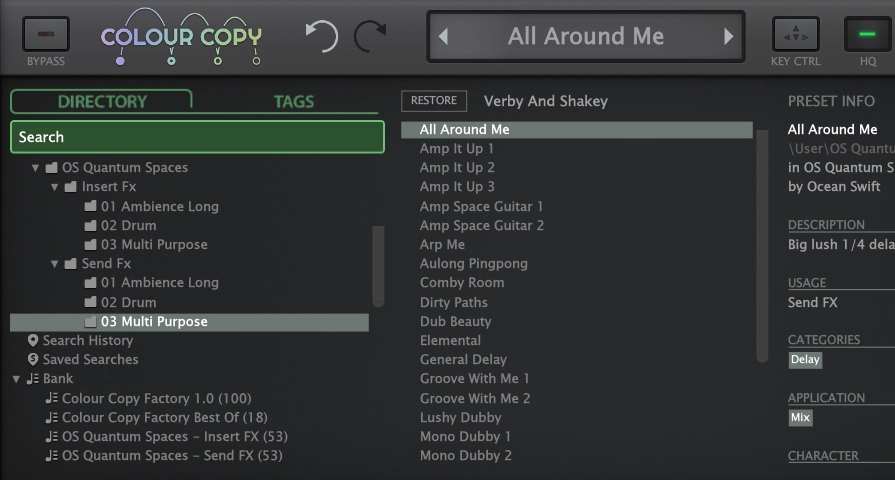

Insert FX and Send FX presets
Quantum Spaces explores 3 main themes, “Ambience Long”, “Drum” and “Multi Purpose”.
To make your experience smoother and more efficient, we’ve organized Quantum Spaces presets into folders and subfolders. Each effect is thoughtfully named, tagged, and categorized, allowing you the flexibility to either utilize the tagging system or simply explore the folders at your leisure. Finding what you need should be a easy.
Plus we’ve separated INSERT FX and SEND FX into their own distinct folders and banks.
Full NKS support
NKS support, for Maschine and Komplete Kontrol.
“Infinite possibilities bloom,
then fade,
into the next breath of existence.”